

Table of Contents
- At-a-Glance: Quick Comparison Table
- Detailed Technical and Functional Comparison: Gemini Free vs Google AI Pro
- Google AI Pro: Professional and Student-Oriented Features
- Which Plan Is Better for Which Job / Workflow? (User-Based Guide)
- Special Section for Students: 12 Months Free Google AI Pro
- Real-World Tests: Free vs Pro Comparison (Recommendations + Measurements)
- Security, Privacy, and Usage Restrictions
- Conclusion
Share
In recent years, artificial intelligence (AI) technologies have become an integral part of daily life and workflows for everyone, not just software developers, but also students, content creators, researchers, and academics. From education to business, from content creation to data analysis, AI accelerates work processes, increases efficiency, and transforms user experiences. At the center of this transformation is Google, which is launching its own revolution in generative AI with the Gemini brand. Gemini offers two main plans targeting different use cases for both individual and professional users: Gemini Free and Google AI Pro.
A critical question frequently asked by users is: which is more logical, the free Gemini version or the Google AI Pro package? This decision depends not only on the monthly fee difference but also on factors such as model access, feature coverage, storage capacity, productivity tools, and special advantages for students. For example, the 12-month free Pro access offered to students can directly impact the quality and speed of research projects, assignments, and thesis work. For content creators, advanced productivity tools such as Veo, Flow, and Whisk significantly accelerate video and visual content production, saving both time and costs. For developers, the coding and error detection support provided by Gemini 2.5 Pro offers a much deeper, more accurate, and faster experience compared to the limited model access in the Free version.
In this comparative article, we will examine the Gemini Free and Google AI Pro plans in full detail. We will analyze which plan is more suitable for each user profile, which workflows benefit from which plan, and specifically, the opportunities provided by the newly announced “1-year free Pro for students” campaign. Additionally, we will provide a comprehensive evaluation of model performance, visual and video production capacity, storage space, AI credit usage limits, and the functionality of integrated tools such as NotebookLM. This way, readers will be able to make an informed decision based not only on price but also on needs and usage scenarios.
In summary, this article will serve as a guide for students, content creators, and professional developers alike, clearly highlighting which plan is the most advantageous in different situations within Google’s AI ecosystem.
At-a-Glance: Quick Comparison Table
| Feature / Criteria | Gemini Free | Google AI Pro |
|---|---|---|
| Monthly Fee | 0 ₺ (Free) | 799.99 ₺ / month |
| Model Access | Gemini 2.5 Flash (limited) | Gemini 2.5 Pro (full access) |
| AI Credits / Limits | Daily limited query quota | 1,000 AI credits per month |
| Cloud Storage | 15 GB (standard) | 2 TB (including Google One) |
| Additional Tools & Integrations | Basic chat + text/visual analysis | Gemini 2.5 Pro + Veo, Flow, Whisk, Deep Research, NotebookLM (with high limits), Gmail/Docs/Sheets integration |
| Student Offer | None | 1 year free Pro (via SheerID verification) |
Detailed Technical and Functional Comparison: Gemini Free vs Google AI Pro
Google’s AI platform Gemini offers two different plans for both free and professional users. In this section, we will examine all the technical and functional differences between the Gemini Free and Google AI Pro plans in detail. This way, both students and professional content creators and researchers can clearly understand which plan suits their needs.
Gemini Free: What Features Are Free?
Gemini Free provides a basic AI experience accessible to everyone. This plan is designed especially for students who want to experiment with AI, individual users, and simple content creators.
Core Features
Model Access: Gemini Free runs on a limited model version, Gemini 2.5 Flash. This model is sufficient for simple chat and text generation tasks but is limited for deep research and complex content creation.
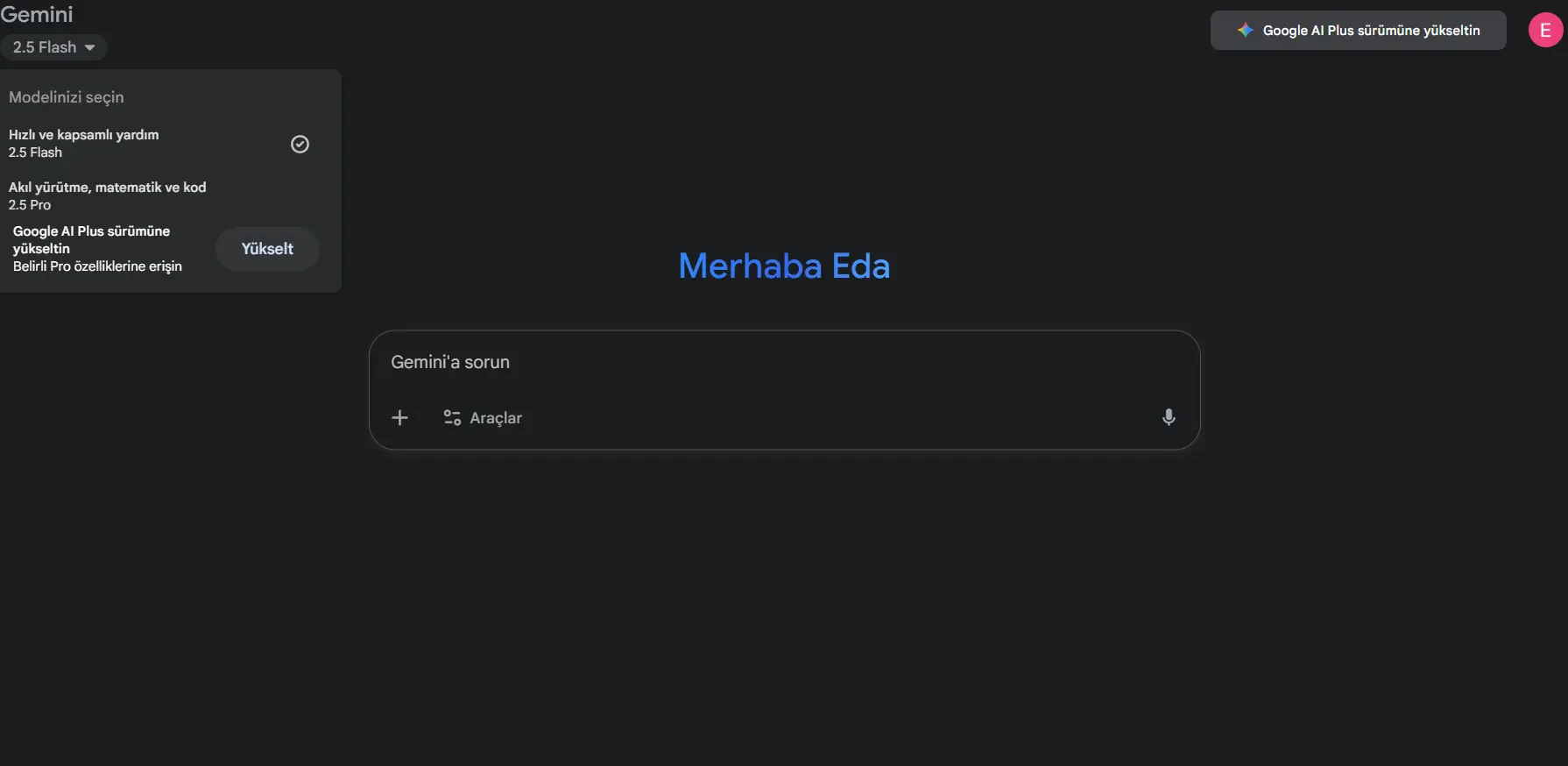
Text Analysis: Users can perform basic AI tasks such as text summarization, homework, and report assistance. For example, summarizing short texts or answering simple questions is possible.
Visual Analysis: Some visual upload and analysis capabilities are provided in a limited manner; for example, basic descriptions and object recognition can be performed on small-sized images.
NotebookLM: NotebookLM support for Free users is limited; there are daily query and document size restrictions, making it unsuitable for large PDFs or long academic documents.
Deep Research: This plan does not provide access to advanced research features. Users can only utilize basic web data and general knowledge bases.
Usage Limits
Daily / Monthly Query Limit: Free plan users have a limited number of queries per day. Response times may increase for complex and lengthy tasks.
API and Integrations: Limited API access is provided with the Free plan. Requests per minute and daily token limits are restricted.
Storage: Users are limited to standard Google storage (15 GB), which may not be sufficient for large projects or file archives. Gemini Free is ideal for experimenting with AI, completing homework, or producing short content. However, it is limited for deep research, long text processing, or high-volume visual/video production tasks.
Google AI Pro: Professional and Student-Oriented Features
Google AI Pro is an advanced subscription plan designed for professional content creators, researchers, and students. AI Pro overcomes the limitations of Gemini Free with stronger model access, an expanded toolset, and higher usage limits.
Advanced Features
Model Access: AI Pro users have full access to the Gemini 2.5 Pro model. This model is much more capable of understanding long texts, performing complex analyses, and generating advanced conversations.
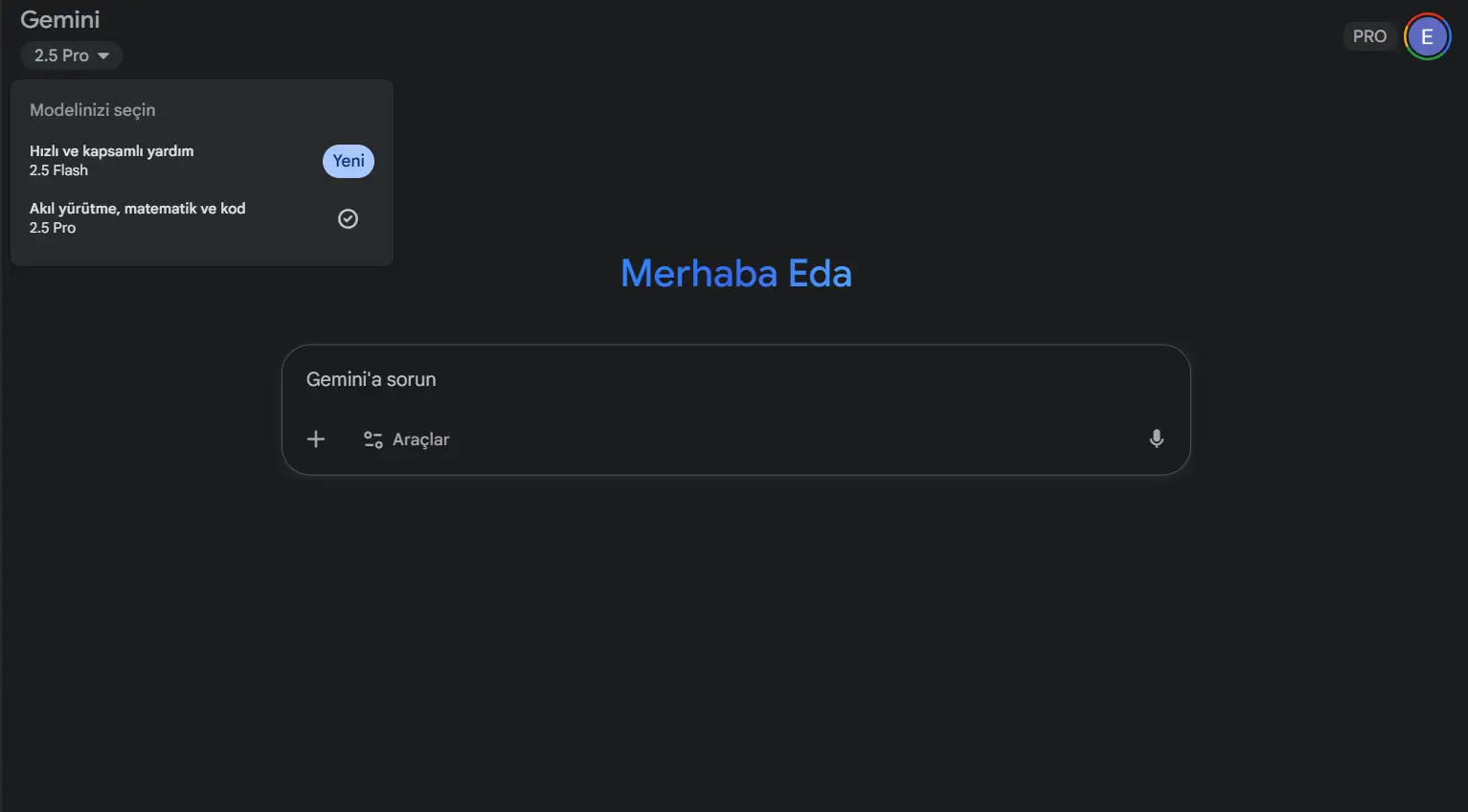
Deep Research: AI Pro provides the Deep Research feature developed for academic and professional research. With this feature, users can quickly gather, summarize, and generate analysis reports from reliable sources.
Visual and Video Tools: AI Pro includes advanced production tools such as Veo, Flow, and Whisk. Users can produce high-quality video content, analyze visuals, and directly integrate media content into their projects.
NotebookLM: NotebookLM support is expanded, increasing the capacity for processing large PDFs and documents. Long academic reports or research summaries can now be produced quickly and comprehensively.
Storage and Integrations: 2 TB of Google One storage is provided, offering ample storage space. Full integration with Gmail, Docs, Sheets, and other Google applications is supported.
Usage Limits and Credits
AI Credits: AI Pro users have 1,000 AI credits per month. These credits can be used for video production, deep research, and high-processing tasks.
Speed and Priority: AI Pro users benefit from faster response times and priority processing compared to Free plan users.
Student Advantages
Students can access the AI Pro plan for free for one year through SheerID verification. During this period, they receive 2 TB storage, full Gemini 2.5 Pro access, and all productivity tools. For educational and project purposes, AI Pro offers significant advantages for homework, theses, reports, and visual/video content creation.
Google AI Pro offers a much more comprehensive AI experience than Gemini Free. It is especially ideal for deep research, content creation, and academic projects. The one-year free access opportunity for students is a significant advantage that increases the plan’s value.
Which Plan Is Better for Which Job / Workflow? (User-Based Guide)
Plan Selection for Students
For students, Google Gemini offers both basic and advanced AI support depending on their needs. The Gemini Free plan provides a functional solution for tasks such as preparing class summaries, taking quick notes, and generating exam-related content. Under the Free plan, users have limited access to the Gemini 2.5 Flash model and can perform up to 50 chat queries and 100 visual outputs per day via NotebookLM. Additionally, users can generate 20 audio summaries daily with Audio Overviews and create up to 5 deep research reports per month using the Deep Research feature. Storage is limited to the standard 15 GB shared across Google Drive, Gmail, and Photos.
For more extensive academic work, thesis summaries, large PDF file analyses, and advanced visual or audio content creation, the Google AI Pro plan stands out. The Pro plan provides full access to the Gemini 2.5 Pro model, allowing 250 chat queries and 500 visual outputs per day via NotebookLM, enabling comprehensive research and content creation workflows. Users can generate up to 100 audio summaries daily with Audio Overviews and up to 20 deep research reports per month. With 2 TB of Google One storage, large files can be securely stored.
A special advantage for students is one year of free Pro access via SheerID verification, enabling tasks such as exam reviews, homework and project preparation, thesis or research document summarization, and visual analysis without additional cost.
Plans for Content and Video Creators
For content and video creators, Google AI Pro provides advanced multimedia production tools and higher usage limits that are not available in the Free plan. Tools like Veo, Flow, and Whisk allow the creation of both visual and short video content. The monthly 1,000 AI credits enable creators to use these tools intensively, speeding up production workflows. Users can generate high-quality visuals and videos, accelerate media analysis, and integrate outputs into projects. In contrast, the Free plan only offers guidance and content suggestions and does not support video production.
Plans for Developers and Coders
For developers, Google AI Pro offers advantages for speeding up workflows and optimizing coding processes. Gemini Code Assist and Gemini CLI tools provide high daily request limits and advanced features for complex code completion, error detection, and optimization tasks. AI credits can be actively used for coding and development projects. The Free plan, by comparison, offers limited model access and lower daily request limits, providing only basic support. Pro features increase speed and efficiency in large and complex projects, expand API usage capacity, and meet professional developers’ needs.
Plans for Researchers and Academics
For researchers and academics, Google AI Pro enables comprehensive work on large academic documents, theses, and research reports. With the expanded NotebookLM capacity, large PDFs and academic materials can be effectively summarized, and sources and references can be accurately extracted. The Deep Research feature allows the creation of up to 20 deep research reports per month, and Audio Overviews enables voice summaries, facilitating rapid analysis of large datasets. The 2 TB storage provided by the Pro plan allows researchers to securely store and manage their projects and documents. While the Free plan offers only limited PDF summarization and basic research support, the Pro plan stands out as a comprehensive and professional solution.
Special Section for Students: 12 Months Free Google AI Pro
Google offers the Google AI Pro plan completely free for 12 months to help students maximize the benefits of artificial intelligence during their education. This campaign provides a significant opportunity, especially for university and higher education students, allowing them to effectively use AI-based tools while studying, preparing assignments and projects, or conducting academic research. To participate, students must be at least 18 years old, enrolled in a valid higher education institution, and verify their status through SheerID. Additionally, only a personal Google account (Gmail) can be used, and the offer is available only to students in specific countries. The application and registration process is straightforward: students visit the official link, verify their school documents via SheerID, and activate their subscription by selecting “Claim Student Offer.”
With this plan, students gain access to expanded AI tools tailored for educational and project-focused use. The Gemini 2.5 Pro model enables quick analysis of lecture notes and academic content, allowing students to generate personalized content suited to their learning process. The Deep Research tool provides in-depth text analysis and source scanning for academic research, while NotebookLM allows large PDFs and thesis files to be summarized, research documents to be scanned, and efficient note-taking workflows to be executed. Students can also create videos from text using the Veo 3 Fast tool for lectures or project materials, produce creative content through text and visual integration with Whisk, and support their learning process by listening to lecture notes or summaries using Audio Overviews. Furthermore, the campaign includes 2 TB of cloud storage fully integrated with Google Drive, Gmail, and Photos, ensuring all study materials are securely stored and easily accessible.
No payment information is required from students during the campaign, and those already on a high-capacity storage plan are not eligible. Once verification is completed, the free Pro access is valid for 12 months, significantly accelerating academic activities such as exam preparation, project work, and assignment production, thereby increasing efficiency. After the campaign ends, students can choose to switch to a paid plan, continuing to benefit from Pro features.
Real-World Tests: Free vs Pro Comparison (Recommendations + Measurements)
This section presents suggested scenarios to test the performance of Gemini Free and Google AI Pro plans and their advantages in different workflows.
Deep Research Task
In this scenario, a comprehensive report was generated using the same three academic sources on both Gemini Free and Google AI Pro. The results clearly highlight the differences between the two plans:
| Feature / Criterion | Free Account | Pro Account |
|---|---|---|
| Maximum report length | ~300–400 words (summary/recommendation) | 1000+ words, comprehensive report |
| Synthesis of source findings | Limited, general assumptions | Detailed synthesis with representative academic analysis |
| Analysis and recommendations | Simple, brief suggestions | In-depth analysis and recommendations |
| Speed and processing capacity | Fast for short content | Fast for long content production |
| Usage recommendation | For summaries, outlines, or quick ideas | For academic reports, theses, or deep research |
Visual Problem Solving: Free vs Pro Comparison
In this scenario, the same math problem image was used to generate step-by-step solutions on Gemini Free and Google AI Pro. Results clearly demonstrate the differences:
| Feature / Criterion | Free Account | Pro Account |
|---|---|---|
| Step-by-step explanation | Summary, brief explanation | Detailed, each step fully explained |
| Calculation accuracy | Correct, but limited detailed verification | Fully verified and reliable |
| Visual analysis capability | Basic, limited | Advanced, utilizes all visual information |
| Speed | Fast | Fast and includes all steps |
| Usage recommendation | For quick solutions and ideas | For academic or detailed problem solving |
Technology Visual Generation: Free vs Pro Comparison
In this scenario, Free and Pro accounts were used to generate a simple but professional technology visual. The aim was to observe differences in visual quality and detail:
| Feature / Criterion | Free Account | Pro Account |
|---|---|---|
| Visual detail | Basic, minimal | Professional, closely matches requirements |
| Icon and panel richness | Simple and limited | Fully detailed as requested |
| Color and tone | Simple, flat colors | Desired toning and shading applied |
| Generation speed | Fast | Fast, but more detailed |
| Usage recommendation | Simple blog or demo | Professional blog, presentation, or marketing |
FREE VERSION

PRO VERSION

Short Technology Video Production: Free vs Pro Comparison
In this scenario, a 5-second short technology video was produced using Free and Pro accounts. The goal was to compare video production capabilities and output differences.
-
Free Account: Veo video production tool is not available, so actual video creation was not possible. The Free plan only generated written guidance on how to produce the video. Visualization or animation could not be directly generated.
-
Pro Account: The Veo tool enabled real video production. The video followed the steps in the prompt and included animated graphics and icons. The output was far more visually impressive and engaging compared to Free.
Large PDF Summary Production: Free vs Pro Comparison
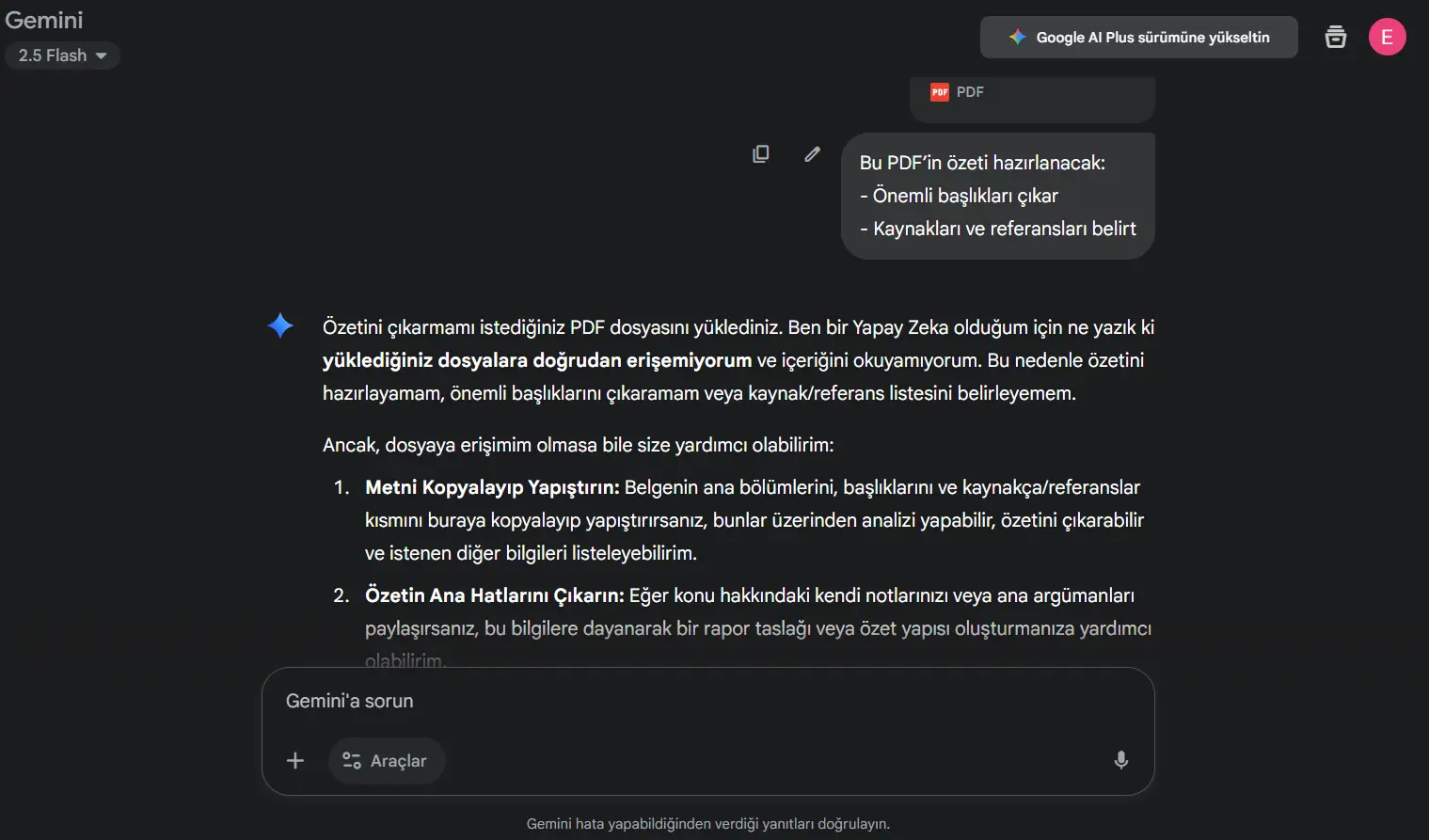
This scenario tested summarizing a PDF document using Free and Pro accounts to compare speed, depth, and reference extraction.
-
Free Account: Could not directly access the PDF, so the summary had to be manually copied or the outline provided by the user.
-
Pro Account: Uploaded the PDF and produced a full summary with headings and extracted references. Pro handled large files with higher speed and deeper detail.
Code Completion and Debugging: Free vs Pro Comparison
This scenario involved completing and debugging a Python code block to compare performance, speed, and token/request usage.
Sample Prompt
# Example Python code
def fibonacci(n):
"""
Returns a Fibonacci sequence of n elements.
"""
fib = [0, 1]
# Missing code here
return fib
# Test
print(fibonacci(10))
Tasks:
- Complete missing code
- Detect and fix errors
Free Account Result
def fibonacci(n):
"""
Returns a Fibonacci sequence of n elements.
"""
if n <= 0:
return []
if n == 1:
return [0]
`# Initialize: first two elements`
`fib = [0, 1]`

`# Loop while n > 2`
`for i in range(2, n):`
    `# Sum the last two elements`
    `next_fib = fib[-1] + fib[-2]`
    `fib.append(next_fib)`
`return fib`
# Test
print(f"fibonacci(10): {fibonacci(10)}")
print(f"fibonacci(1): {fibonacci(1)}")
print(f"fibonacci(0): {fibonacci(0)}")
Highlights:
- Free correctly implements the basic logic
- Loop and list operations work without errors
- Edge cases (n ≤ 0 and n = 1) handled
- Complex debugging and optimization are limited
Pro Account Result
def fibonacci(n):
"""
Returns a Fibonacci sequence of n elements.
"""
# --- Error Detection and Correction ---
if n <= 0:
return []
if n == 1:
return [0]
`fib = [0, 1]`

`# --- Complete Missing Code ---`
`while len(fib) < n:`
    `new_element = fib[-1] + fib[-2]`
    `fib.append(new_element)`
`return fib`
# Test
print(fibonacci(10))
Highlights:
- Pro completes the code fully and corrects logical errors
whileloop provides a more dynamic and extensible structure- Edge cases handled, ensuring safe output
- Performance and readability superior for complex code blocks
Pro Account Exclusive Feature: Import Code from GitHub
Pro users can import directly from GitHub repositories or specific branches. This feature is not available in the Free plan.
Feature Details
- Add or import files: Users can click “Import Code” and provide a GitHub repo or branch URL
- GitHub integration: Upon import, the selected repository or branch is automatically activated and imported
Advantages:
- Directly import projects without manual copying
- Free users can only paste code manually or use small snippets

Security, Privacy, and Usage Restrictions
When using the Google Gemini platform, protecting personal data and ensuring safe, ethical, and efficient usage of the platform are of utmost importance. The platform can process text, visual, and audio content, provide analyses, and enable the creation of productive content through various AI-based tools. However, regardless of whether users are students, content creators, developers, or academics, there are strict warnings that sensitive information such as personal identification, bank accounts, passwords, and other confidential data should not be uploaded to the platform. Such information does not fall within the data categories the platform is designed to process or store, and sharing it poses serious risks to both user safety and data privacy. Users can learn more about how their data is processed, stored, and shared by visiting the Google AI Privacy Policy, allowing them to use the platform consciously and safely.
Content usage policies on the platform are as critical as security. Both Free and Pro users must ensure that the content they upload complies with legal and ethical standards. Key points to consider include:
Copyrighted material: Uploading movies, music, books, or images without permission may lead to legal issues.
Personal and sensitive data: Identification details, banking or health information, and other private data must not be uploaded.
Legally protected documents: Sharing confidential or legal documents carries both ethical and legal risks.
Additionally, the accuracy of AI-generated content must always be verified. In academic research, project presentations, or commercial use, incorrect information can lead to wrong decisions or loss of trust. Users should consider these limitations, ensure data security, and verify that the content they produce complies with legal and ethical standards.
The differences between Free and Pro plans are not limited to features and usage limits; they also relate to user responsibility in data processing and adherence to ethical guidelines in content creation. Users should carefully review AI-processed outputs for accuracy, avoid uploading sensitive or private information, and ensure that their content respects copyright and legal restrictions. When necessary, additional verification and security measures should be applied.
These precautions guarantee that both Free and Pro users can use the Google Gemini platform safely, efficiently, and responsibly, while maximizing the benefits of AI-based tools.
Conclusion
The Google Gemini platform offers a powerful AI experience for both educational and professional use, with plan options tailored to different user types. Choosing the most suitable plan is critical not only in terms of budget but also in workflow efficiency, content production capacity, storage, and model access.
For Students
The clearly recommended plan for students is Google AI Pro. The 12-month free Pro access offered through the student promotion enables effective use of AI-powered tools throughout the learning process. With this plan, students gain unlimited access to the Gemini 2.5 Pro model, allowing them to analyze lecture notes and quickly create assignments and project materials. NotebookLM support facilitates summarization of large academic files, as well as scanning and processing theses or research documents. The 2 TB cloud storage allows all learning materials, documents, and projects to be securely stored. These advantages improve time management, enhance productivity, and elevate research quality during exam preparation and project work. However, students should note that campaign duration and availability may vary by region, and all verification requirements, such as SheerID authentication, must be fully completed.
For Professional Content Creators
Content creators can benefit significantly from the Google AI Pro plan in terms of high-quality media production and visual content integration. The Veo 3 Fast video production tool allows the creation of video content from text, while Flow and Whisk integrations enable creative combinations of visual and textual content. Content creators, particularly in social media, education, or marketing projects, can accelerate workflows and produce professional-quality materials in a short time. The plan’s AI credits and high usage limits ensure time efficiency and sustained production of high-quality content.
For Developers
For developers, Google AI Pro offers a comprehensive toolset that optimizes software development processes. Gemini Code Assist speeds up coding, while CLI tools enhance automation and efficiency in large projects. These tools allow developers to quickly identify coding errors, receive suggestions, and shorten project delivery timelines. The plan’s high API usage limits and extended request capacity boost performance in team projects and professional development environments. Additionally, cloud storage and AI-powered tools provide secure, centralized management of code and project files.
Quick Decision Table:
| Scenario | Recommended Plan |
|---|---|
| If you are a student and the promotion is valid | Google AI Pro |
| If you are a professional content creator | Google AI Pro |
| If you are a developer needing coding support | Google AI Pro |
In all cases, Google AI Pro provides a comprehensive and powerful solution for students, content creators, and developers alike.
While the Free plan may suffice for basic use with limited features, the Pro plan becomes indispensable for large-scale projects, research, media production, or software development due to its high efficiency, advanced features, and time-saving capabilities.
Users who carefully assess their needs and fully leverage the platform’s features can significantly enhance both their academic and professional outcomes.
“Writing is seeing the future.” Paul Valéry